

With our ChurchSuite app on your smart phone or tablet you can quickly access the full functionality of ChurchSuite, helping you to keep in touch wherever you are, or log in to your church’s My ChurchSuite account, keeping you up to date with the latest at Harefield Church.

ChurchSuite is an amazing tool that we use as a church to help keep the church connected and informed.  We use it for:

  • Our church contact and address book
  • Serving and ministry rota’s
  • Calendar & events
  • Coffee Connect groups
  • Managing check in and safety for children on a Sunday
  • Linking to Harefield’s newletters

We have provided help with some common questions.

It’s possible to access ChurchSuite from either:

  • A web browser on a computer/tablet/smart phone
  • The ChurchSuite App on a Smart phone/tablet

To log into ChurchSuite via a web browser all you need to do is:

  • Go to https://churchsuite.com/
  • Enter in our church name ‘Harefield Church’
  • Select ‘Harefield Church’ when it appears
  • Then click on ‘Next’
  • Enter in your user name – which is your email address
  • Then the password you created
  • And finally click on ‘Log in’

All you need to do is follow these easy steps:

  1. Go to the login page https://login.churchsuite.com/
  2. Click the link at the bottom called ‘Help! I’ve forgotten my password’
  3. Enter in the email address your registered with
  4. Then click on ‘Send Password Reset’

It’s possible to access ChurchSuite from either:

  • A web browser on a computer/tablet/smart phone
  • The ChurchSuite App on a Smart phone/tablet

The ChurchSuite app is available to download for free, get the:

Once you have downloaded the app to your phone, all you need to do to login is enter:
  1. Your username – This is the email address you registered with
  2. Your password – This is the password you created
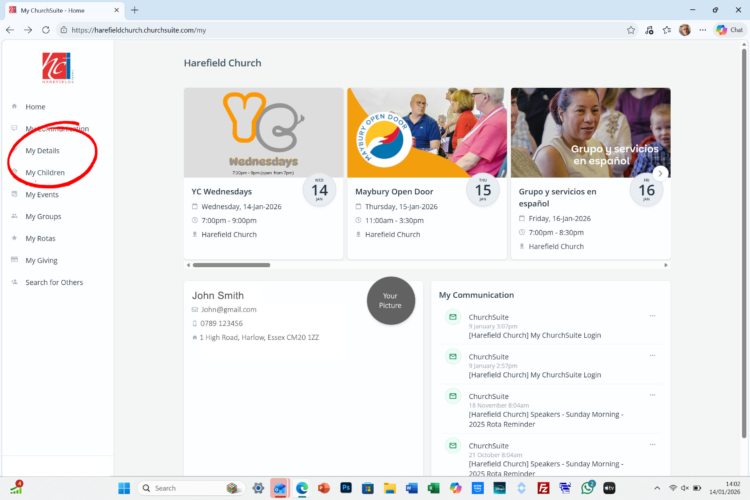
  1. Log into ChurchSuite on your computer using a broswer when wantto update and challenge your details, such, email address, telephone number or home address.  You can add or update your photo.
  2. On the left you will see a menu column – Click on ‘My Details’
  3. Click on the pen icon in the right-hand corner of section you want to change.  For example, ‘Communications’ for email, telephone and address.
  4. Once updated scroll to the bottom and click on ‘Save Changes’.
  1. Log into ChurchSuite on your computer using a broswer 
  2. On the left you will see a menu column – Click on ‘My Details’
  3. Click on the pen icon in the right-hand corner of the ‘Privacy’ section you can change what is visible to other ChurchSuite users.
  4. You can then decide which of your following details you would like to make visible to your church community, by checking the box next to it. The following options will be displayed:
    – Address
    – Telephone
    – Mobile
    – Email
  5. To save your changes, scroll to the bottom and click on ‘Save Changes’

Login into the ChurchSuite App on your Smart phone/tablet
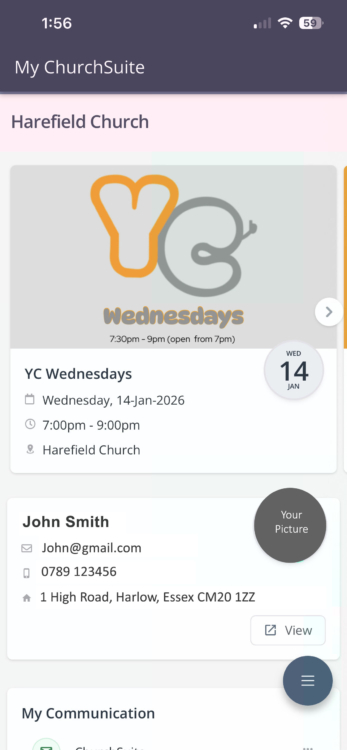
  • You will see the section which displays your current personal details
  • Click on the View button.
  • The new screen will display all your personal details.
  • You can now edit any specific section that requires updating, including picture, contact details and privacy.

Making Jesus known

Harefield Church
Burgoyne Hatch
Momples Road
Harlow
Esses
CM20 3EH

© 2003-2026 Harefield Church.  All Rights Reserved
Harefield Church is a Charitable Incorporated Organisation (CIO) in England and Wales No. 1149323

  • Apple
  • Spotify
  • RSS Feed
error: